
How to center a div vertically and horizontally (modern methods, without fixed size!)
“How to center a div” (inside another div or inside the body itself) is one of the most discussed questions ever, and to my surprise there are masses of tutorials which totally over-complicated this issue, usually also with lots of disadvantages, like a fixed height and width of the content div. However, there’s a simple, non-hacky, clean, responsive-ready and crossbrowser-safe method that also does not need any fixed pixel size div settings:
- Totally crossbrowser-safe. Works in all browsers (IE8 and higher).
- Totally liquid, no div size needed
- Totally clean, no weird hacks. All code is used the way it should be used.
Method 1: Center a div in the middle of the viewport
CSS
html, body {
    margin: 0;
    padding: 0;
    width: 100%;
    height: 100%;
    display: table;
}
.container {
    display: table-cell;
    text-align: center;
    vertical-align: middle;
}
.content {
    background-color: red; /* just for the demo */
    display: inline-block;
    text-align: left;
}
HTML
<div class="container">
    <div class="content">
        content content content
        <br/>
        moooooooooooooooore content
        <br/>
        another content
    </div>
</div>
Result
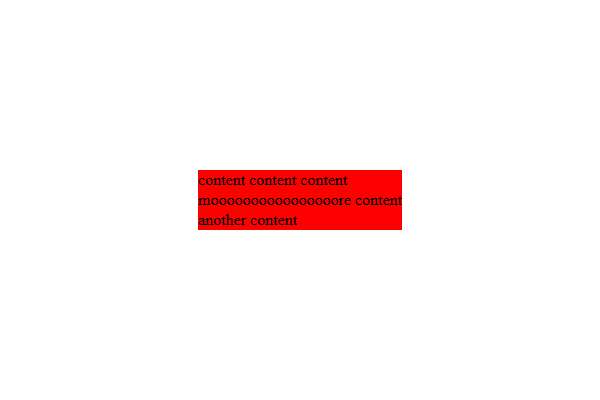 See the JSFiddle here: http://jsfiddle.net/panique/pqDQB/35/
Method 2: Center div vertically and horizontally inside an other div
This is very useful for situation when you have to center content inside a div that don’t have a certain pixel size. Please note that this really doesn’t need ANY pixel size definition. For demo purposes we give the parent div demo pixel sizes, just to create a visible example. CSS
.parent {
    display: table;
    /* optional, just for the demo */
    height: 300px;
    background: yellow;
}
.child {
    display: table-cell;
    vertical-align: middle;
    /* optional, just for the demo */
    background: red;
}
.content {
    /* optional, just for the demo */
    background: blue;
}
HTML
XXX
Result